|
QuadUI 1.2.9 public beta
Run-time API for QuadUI
|
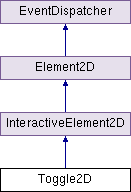
Public Member Functions | |
| void | Toggle () |
| sealed override void | Enable () |
| sealed override void | Disable () |
| void | SetVal (bool val) |
Public Attributes | |
| bool | dimOnDisable = true |
Protected Member Functions | |
| virtual void | Init () |
| virtual void | On () |
| virtual void | Off () |
| virtual void | OnToggle () |
Properties | |
| bool | val [get] |
| Vector2 | onUV [get] |
| Vector2 | offUV [get] |
| Vector2 | onOverUV [get] |
| Vector2 | offOverUV [get] |
Basic Toggle class. Contains States for On, On-Over, Off, and Off-Over.
Note: Over states are not available under iOS/Android Build Settings.
| sealed override void Toggle2D.Disable | ( | ) | [virtual] |
Extended version of InteractiveElement2D.Disable() to integrate a dimmer on enable/disable. See related Toggle2D.dimOnDisable.
Reimplemented from InteractiveElement2D.
| sealed override void Toggle2D.Enable | ( | ) | [virtual] |
Extended version of InteractiveElement2D.Enable() to integrate a dimmer on enable/disable. See related Toggle2D.dimOnDisable.
Reimplemented from InteractiveElement2D.
| virtual void Toggle2D.Init | ( | ) | [protected, virtual] |
Use this hook for any generic initialization.
Note: This is not called automatically by the framework, this is something you will have to call yourself.
| virtual void Toggle2D.Off | ( | ) | [protected, virtual] |
Hook called when toggle is switched Off.
| virtual void Toggle2D.On | ( | ) | [protected, virtual] |
Hook called when toggle is switched On.
| virtual void Toggle2D.OnToggle | ( | ) | [protected, virtual] |
| void Toggle2D.SetVal | ( | bool | val | ) |
| void Toggle2D.Toggle | ( | ) |
| bool Toggle2D.dimOnDisable = true |
Vector2 Toggle2D.offOverUV [get] |
Returns a Vector2 representation of the top-left UV coordinate for the "Off" state, but with a MouseOver state. This is the same as frames[1]
Note: MouseOver states are not available under iOS/Android Build Settings
Vector2 Toggle2D.offUV [get] |
Returns a Vector2 representation of the top-left UV coordinate for the "Off" state. This is the same as frames[0]
Vector2 Toggle2D.onOverUV [get] |
Returns a Vector2 representation of the top-left UV coordinate for the "On" state, but with a MouseOver state. This is the same as frames[3]
Note: MouseOver states are not available under iOS/Android Build Settings
Vector2 Toggle2D.onUV [get] |
Returns a Vector2 representation of the top-left UV coordinate for the "On" state. This is the same as frames[2]
bool Toggle2D.val [get] |
Is the toggle on?
 1.7.3
1.7.3 
