|
QuadUI 1.2.9 public beta
Run-time API for QuadUI
|
Public Member Functions | |
| void | Play (string state) |
| void | Stop () |
| void | Pause () |
| void | ManuallySetNormalizedTime (string animState, float _normalizedTime) |
Public Attributes | |
| AnimationState | _currentState |
Protected Member Functions | |
| virtual void | OnAnimationBegin () |
| virtual void | OnAnimationStop () |
| virtual void | OnAnimationComplete () |
| virtual void | OnLoop () |
Properties | |
| bool | isPlaying [get] |
| AnimationState | currentState [get] |
TimescaleIndependentAnimations are just that, an Animation that ignores Time.timeScale and will play regardless of what Time.timeScale is. This is achieved by a custom deltaTime variable, found in QuadUI.deltaTime.
Note: This component invokes RequireComponent, and requires an Animation component attached to its GameObject. It is also important to note that AnimationEvents are not currently available through this method of playback. There are a few hooks provided for you to attach code at certain points of the animation in this class.
| void TimescaleIndependentAnimation.ManuallySetNormalizedTime | ( | string | animState, |
| float | _normalizedTime | ||
| ) |
Takes the <string> name of the AnimationState and the <float> 0.0F-1.0F desired normalizedTime of the animation you wish to move to. Allows you to manually set the normalizedTime of the provided AnimationState.
| virtual void TimescaleIndependentAnimation.OnAnimationBegin | ( | ) | [protected, virtual] |
This function is virtual and can be overridden when extending this class.
This function is intended to be a hook and is called from Play(string state). You should use this function to execute any code you want to happen when the AnimationState begins playing.
| virtual void TimescaleIndependentAnimation.OnAnimationComplete | ( | ) | [protected, virtual] |
This function is virtual and can be overridden when extending this class.
This function is intended to be a hook and is called when the AnimationState successfully reaches a normalizedTime of 1. You should use this function to execute any code you want to happen when the AnimationState finishes playing.
Note: This hook will only be called if the wrapMode of the current AnimationState is set to Default or Once.
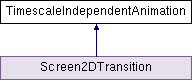
Reimplemented in Screen2DTransition.
| virtual void TimescaleIndependentAnimation.OnAnimationStop | ( | ) | [protected, virtual] |
This function is virtual and can be overridden when extending this class.
This function is intended to be a hook and is called from Stop(). You should use this function to execute any code you want to happen when the AnimationState is told to stop playing.
| virtual void TimescaleIndependentAnimation.OnLoop | ( | ) | [protected, virtual] |
This function is virtual and can be overridden when extending this class.
This function is intended to be a hook and is called when the AnimationState successfully reaches a normalizedTime of 1, before it loops back to 0 and continues playing. You should use this function to execute any code you want to happen when the AnimationState loops.
Note: This hook will only be called if the wrapMode of the current AnimationState is set to Loop.
| void TimescaleIndependentAnimation.Pause | ( | ) |
Stops the current AnimationState from updating, but retains its current frame. Note: There is no hook called from Pause.
| void TimescaleIndependentAnimation.Play | ( | string | state | ) |
Takes the <string> name of the AnimationState. Internally updates the normalized time with a Time.timeScale independent delta (QuadUI.deltaTime). The provided AnimationState will have a weight of 1, be on layer 1, use AnimationBlendMode.Blend. Calling this function sets the normalizedTime to 0 before playing if the animation is not Paused, otherwise it picks up where it left off.
Note: The provided AnimationState will retain the wrapMode defined in its creation. The hook OnAnimationBegin() is called from this function.
| void TimescaleIndependentAnimation.Stop | ( | ) |
Stops the current AnimationState from updating and returns the animation to frame 1. Note: When calling Stop() all data set when calling Play() is reset, and normalizedTime will be set to 0 resulting in the animation returning to frame 1.
The hook OnAnimationStop() is called from this function.
| AnimationState TimescaleIndependentAnimation._currentState |
AnimationState TimescaleIndependentAnimation.currentState [get] |
Read only. Returns the current AnimationState of the animation.
bool TimescaleIndependentAnimation.isPlaying [get] |
Read only. Returns true if the animation is playing, false if it is not.
 1.7.3
1.7.3 
