|
QuadUI 1.2.9 public beta
Run-time API for QuadUI
|
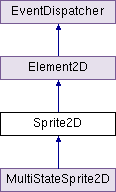
Public Member Functions | |
| void | PlayAnimation () |
| void | StopAnimation () |
| void | Step () |
| void | GoToFrame (int index) |
Public Attributes | |
| Vector2[] | frames |
| bool | playOnAwake = false |
| bool | reverse = false |
| bool | wrap = true |
| int | fps = 0 |
Protected Member Functions | |
| virtual void | OnUpdate () |
| virtual void | Init () |
Protected Attributes | |
| int | _currFrame = 0 |
Properties | |
| int | currentFrame [get, set] |
An non-interactive, animated Sprite which ignores Time.timeScale.
Note: This class uses both Awake() and Update(). If you are extending this class, please use Init() instead of Awake() and OnUpdate() instead of Update(), these hooks are called from their respective functions to maintain the execution order.
| void Sprite2D.GoToFrame | ( | int | index | ) |
Manually moves to frame index of the specified int.
| virtual void Sprite2D.Init | ( | ) | [protected, virtual] |
This class uses Awake for its own initialization. If you need to use Awake, use Init() instead as it is called from Awake to maintain the execution order.
| virtual void Sprite2D.OnUpdate | ( | ) | [protected, virtual] |
This class uses Update for updating UV coordinates of your Quad. If you need to use Update(), use OnUpdate() instead as it is called from Update to maintain the execution order.
Note: If Sprite2D.animating is false, OnUpdate will not be called.
| void Sprite2D.PlayAnimation | ( | ) |
The sprite will update its UV coordinates on a time step to play the sprite's animation.
| void Sprite2D.Step | ( | ) |
Moves the sprite's UV coordinates to the next frame index, or the previous frame if reverse is true.
Note: If wrap is false it will not move back to frame[0] once the end is reached, or back to frame[frame.Length-1] if in reverse mode.
| void Sprite2D.StopAnimation | ( | ) |
The sprite will stop updating its UV coordinates on a time step, effectively stopping the sprite's animation.
int Sprite2D._currFrame = 0 [protected] |
| int Sprite2D.fps = 0 |
The fixed fps of your sprite animation. If set to 0 it will play back at the game's frame rate, changing on Update().
| Vector2 [] Sprite2D.frames |
Array of all the top-left UV coordinates for each frame.
| bool Sprite2D.playOnAwake = false |
Should the sprite animation play on Awake()?
| bool Sprite2D.reverse = false |
Should the sprite animation play backwards?
| bool Sprite2D.wrap = true |
Should the sprite animation wrap around/loop?
int Sprite2D.currentFrame [get, set] |
Gets the current frame of your animation / Sets the current frame of your animation and updates the UV coordinates as well. Essentially the same as Sprite2D.GoToFrame(int index).
 1.7.3
1.7.3 
