|
QuadUI 1.2.9 public beta
Run-time API for QuadUI
|
Public Member Functions | |
| void | Open () |
| void | OpenWithCustomTransition () |
| void | CloseWithCustomTransition () |
| void | ExpandWithCustomTransition () |
| void | CollapseWithCustomTransition () |
| void | Close () |
| void | Collapse () |
| void | Expand () |
| void | PlayTransition (ScreenTransitionType type) |
| void | TransitionCompleted (ScreenTransitionType type) |
| void | SetVisibleRecursively (bool b) |
| void | EnableRecursively () |
| void | DisableRecursively () |
Public Attributes | |
| Screen2DManager | manager |
| Screen2DTransition | transition |
| int | id |
Protected Member Functions | |
| virtual void | Init () |
| virtual void | OnOpen () |
| virtual void | OnClose () |
| virtual void | OnCollapse () |
| virtual void | OnExpand () |
| virtual void | CustomClose () |
| virtual void | CustomOpen () |
| virtual void | CustomCollapse () |
| virtual void | CustomExpand () |
| virtual void | OnTransitionBegin (ScreenTransitionType type) |
| virtual void | OnTransitionComplete (ScreenTransitionType type) |
| virtual void | OnResolutionChange () |
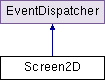
The encapsulating Screen. This should be attached to the GameObject that is the parent Transform of all the UI elements that are contained in this screen.
This class invokes RequireComponent and requires a Screen2DTransition component to be attached. In turn, Screen2DTransition requires an Animation component.
Note: If you are extending this class, do not use Awake() as it is implemented here. Instead, override and use Init() as it is called from within Awake() to maintain execution order.
| void Screen2D.Close | ( | ) |
This will tell the attached Screen2DTransition to play the animation associated with ScreenTransitionType.Close and call the hook OnClose(), effectively closing the screen.
| void Screen2D.CloseWithCustomTransition | ( | ) |
Use this for bypassing Screen2DTransition and making custom transitions or simply making a Screen disappear.
This will call the hook OnClose() where you can define custom transitions hide/show code
| void Screen2D.Collapse | ( | ) |
This will tell the attached Screen2DTransition to play the animation associated with ScreenTransitionType.Collapse and call the hook OnCollapse(), effectively collapsing the screen.
| void Screen2D.CollapseWithCustomTransition | ( | ) |
Use this for bypassing Screen2DTransition and making custom transitions or simply making a Screen disappear.
This will call the hook CustomCollapse() where you can define custom transitions hide/show code
| virtual void Screen2D.CustomClose | ( | ) | [protected, virtual] |
Hook called from CloseWithCustomTransition()
Use this to initiate customized transitions or hide screen content.
| virtual void Screen2D.CustomCollapse | ( | ) | [protected, virtual] |
Hook called from CollapseWithCustomTransition()
Use this to initiate customized transitions or hide screen content.
| virtual void Screen2D.CustomExpand | ( | ) | [protected, virtual] |
Hook called from ExpandWithCustomTransition()
Use this to initiate customized transitions or show screen content.
| virtual void Screen2D.CustomOpen | ( | ) | [protected, virtual] |
Hook called from OpenWithCustomTransition()
Use this to initiate customized transitions or show screen content.
| void Screen2D.DisableRecursively | ( | ) |
Uses Component.GetComponentsInChildren to recursively move through the hierarchy of the screen and call InteractiveElement2D.Disable()
Note: InteractiveElement2D.Disable() is not to be confused with MonoBehaviour.enabled for more info see InteractiveElement2D.Disable()
| void Screen2D.EnableRecursively | ( | ) |
Uses Component.GetComponentsInChildren to recursively move through the hierarchy of the screen and call InteractiveElement2D.Enable()
Note: InteractiveElement2D.Enable() is not to be confused with MonoBehaviour.enabled for more info see InteractiveElement2D.Enable()
| void Screen2D.Expand | ( | ) |
This will tell the attached Screen2DTransition to play the animation associated with ScreenTransitionType.Expand and call the hook OnExpand(), effectively expanding the screen.
| void Screen2D.ExpandWithCustomTransition | ( | ) |
Use this for bypassing Screen2DTransition and making custom transitions or simply making a Screen appear.
This will call the hook CustomExpand() where you can define custom transitions hide/show code
| virtual void Screen2D.Init | ( | ) | [protected, virtual] |
Use this method instead of Awake to perform initialization. It is called from within Awake to maintain the execution order.
| virtual void Screen2D.OnClose | ( | ) | [protected, virtual] |
A hook, called from Close()
| virtual void Screen2D.OnCollapse | ( | ) | [protected, virtual] |
A hook, called from Collapse()
| virtual void Screen2D.OnExpand | ( | ) | [protected, virtual] |
A hook, called from Expand()
| virtual void Screen2D.OnOpen | ( | ) | [protected, virtual] |
A hook, called from Open()
| virtual void Screen2D.OnResolutionChange | ( | ) | [protected, virtual] |
| virtual void Screen2D.OnTransitionBegin | ( | ScreenTransitionType | type | ) | [protected, virtual] |
Hook called from PlayTransition(ScreenTransitionType type). Place code here to execute when a transition begins.
| virtual void Screen2D.OnTransitionComplete | ( | ScreenTransitionType | type | ) | [protected, virtual] |
Hook called from TransitionCompleted(ScreenTransitionType type). Place code here to execute when a transition finishes.
| void Screen2D.Open | ( | ) |
This will tell the attached Screen2DTransition to play the animation associated with ScreenTransitionType.Open and call the hook OnOpen(), effectively opening the screen. Dispatches ScreenEvent.TRANSITION_BEGIN
| void Screen2D.OpenWithCustomTransition | ( | ) |
Use this for bypassing Screen2DTransition and making custom transitions or simply making a Screen appear.
This will call the hook CustomOpen() where you can define custom transitions hide/show code
| void Screen2D.PlayTransition | ( | ScreenTransitionType | type | ) |
Plays the animation associated with the provided ScreenTransitionType. If you are conforming to the framework, this is for communication between the Screen2DManager and the Screen2D and there is no real reason to call this method explicitly.
The hook OnTransitionBegin(ScreenTransitionType type) is called here.
| void Screen2D.SetVisibleRecursively | ( | bool | b | ) |
Uses Component.GetComponentsInChildren to recursively move through the hierarchy of the screen and set Element2D.Visible to the provided boolean value.
| void Screen2D.TransitionCompleted | ( | ScreenTransitionType | type | ) |
This is called from the attached Screen2DTransition upon completion of a transition, there really isn't a reason to call it explicitly.
The hook OnTransitionComplete(ScreenTransitionType type) is called here.
| int Screen2D.id |
Assign an ID to your Screen so that it is distinguishable from other screens by the Screen2DManager.
Note: ID's are NOT automatically generated, this is because they will be used by you when extending Screen2DManager and you need to know what screen is which.
It is imperative to call this method before moving to another Level, especially if the next level contains another instantiation of QuadUI.
It is imperative to call this method before moving to another Level, especially if the next level contains another instantiation of QuadUI.
 1.7.3
1.7.3 
