|
QuadUI 1.2.9 public beta
Run-time API for QuadUI
|
Public Types | |
| enum | InteractionState { None, Out, Over, Down, Up } |
Public Member Functions | |
| void | OnDown (Vector2 pos) |
| void | OnUp (Vector2 pos) |
| void | OnHold (Vector2 pos) |
| void | OnOver (Vector2 pos) |
| void | OnOut () |
| virtual void | Enable () |
| virtual void | Disable () |
Public Attributes | |
| int | id = 0 |
| Vector2[] | frames |
| InteractionState | state = InteractionState.None |
Protected Member Functions | |
| virtual void | OnBecameEnabled () |
| virtual void | OnBecameDisabled () |
| virtual void | OnPress () |
| virtual void | OnRelease () |
| virtual void | OnHoldDown () |
| virtual void | OnRollover () |
| virtual void | OnRollout () |
Properties | |
| bool | isEnabled [get] |
| bool | hasFocus [get] |
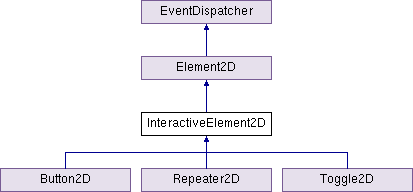
This is the base class for all interactive 2D elements. Use this class to create your own custom UI elements.
This class invokes RequireComponent and must have a MeshCollider attached.
| virtual void InteractiveElement2D.Disable | ( | ) | [virtual] |
Disables the element to accept user input events. Dispatches UIEvent type DISABLE Calls hook OnBecameDisabled()
Note: This is not to be confused with MonoBehaviour.enabled which is completely different. Calling MonoBehaviour.enabled will enable/disable the script's ability to Update, while this function is intended to toggle whether this element can accept user interaction events.
Reimplemented in Toggle2D.
| virtual void InteractiveElement2D.Enable | ( | ) | [virtual] |
Enables the element to accept user input events. Dispatches UIEvent type ENABLE Calls hook OnBecameEnabled()
Note: This is not to be confused with MonoBehaviour.enabled which is completely different. Calling MonoBehaviour.enabled will enable/disable the script's ability to Update, while this function is intended to toggle whether this element can accept user interaction events.
Reimplemented in Toggle2D.
| virtual void InteractiveElement2D.OnBecameDisabled | ( | ) | [protected, virtual] |
Hook called from Disable()
| virtual void InteractiveElement2D.OnBecameEnabled | ( | ) | [protected, virtual] |
Hook called from Enable()
| void InteractiveElement2D.OnDown | ( | Vector2 | pos | ) |
| void InteractiveElement2D.OnHold | ( | Vector2 | pos | ) |
Message recieved when the user is pressing down and then moves out of the object's bounding box.
| virtual void InteractiveElement2D.OnHoldDown | ( | ) | [protected, virtual] |
| void InteractiveElement2D.OnOut | ( | ) |
Message recieved when the user's mouse leaves the bounding box of the UI element. Dispatches UIEvent type ROLLOUT Calls hook OnRollout()
Note: This message is not recieved under iOS/Android build settings.
| void InteractiveElement2D.OnOver | ( | Vector2 | pos | ) |
Message recieved when the user's mouse enters the bounding box of the UI element. Dispatches UIEvent type ROLLOVER Calls hook OnRollover()
Note: This message is not recieved under iOS/Android build settings.
| virtual void InteractiveElement2D.OnPress | ( | ) | [protected, virtual] |
Hook called when the user touches or presses down on a UI element.
| virtual void InteractiveElement2D.OnRelease | ( | ) | [protected, virtual] |
Hook called when the user releases from a UI element.
| virtual void InteractiveElement2D.OnRollout | ( | ) | [protected, virtual] |
Hook called when the user's mouse leaves the bounding box of a UI element.
Note: This hook is not available under iOS/Android Build Settings.
| virtual void InteractiveElement2D.OnRollover | ( | ) | [protected, virtual] |
Hook called when the user's mouse enters the bounding box of a UI element.
Note: This hook is not available under iOS/Android Build Settings.
| void InteractiveElement2D.OnUp | ( | Vector2 | pos | ) |
Message recieved when the user releases from a UI element.
Dispatches UIEvent type RELEASE Calls hook OnRelease()
| Vector2 [] InteractiveElement2D.frames |
Array of all the top-left UV coordinates. Depending on the framework component, they may be labeled in the Inspector as something specific.
| int InteractiveElement2D.id = 0 |
Assign an ID to this element to distinguish it from other elements which are part of the screen.
| InteractionState InteractiveElement2D.state = InteractionState.None |
bool InteractiveElement2D.hasFocus [get] |
Does this object have mouse/touch focus?
bool InteractiveElement2D.isEnabled [get] |
Disables the element to accept user input events.
Note: This is not to be confused with MonoBehaviour.enabled which is completely different. Calling MonoBehaviour.enabled will enable/disable the script's ability to Update, while this is intended to tell you whether this element can accept user interaction events.
 1.7.3
1.7.3 
